




How to Recover a Lost Gmail Account: 6 Proven Methods That Work in 2026
Losing access to a Gmail account hits differently from losing access to most other things online. Gmail is not just an email service for most people. It is the key to everything else: YouTube, Google Drive, Google Photos, saved passwords in Chrome, Google Pay, and dozens of apps that use Google to sign in.
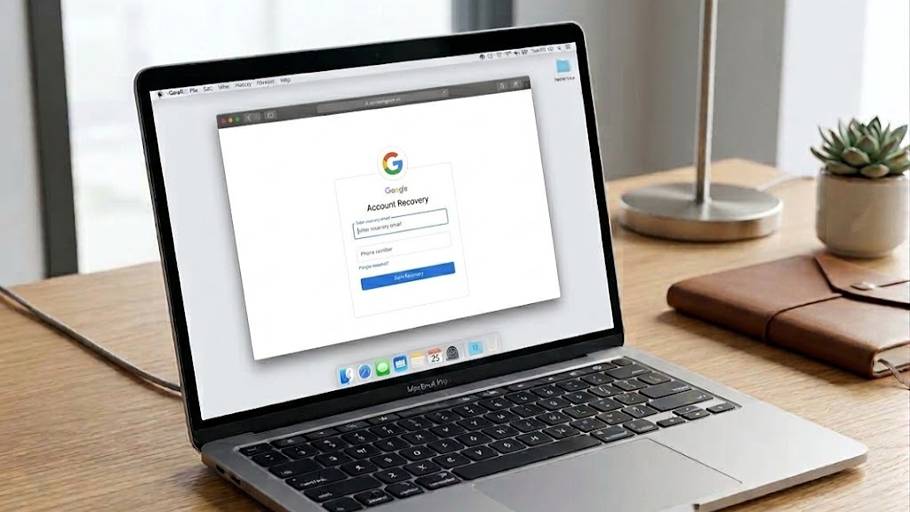
Losing access to a Gmail account hits differently from losing access to most other things online. Gmail is not just an email service for most people. It is the key to everything else: YouTube, Google Drive, Google Photos, saved passwords in Chrome, Google Pay, and dozens of apps that use Google to sign in. When access to Gmail disappears, a significant chunk of your digital life goes with it.
How to recover a lost Gmail account depends on exactly what you have lost and what you still have access to. Forgot your password but still have your phone? That is a five-minute fix. Forgot your email address entirely? Different path. Got locked out after a suspicious login? Different path again. Google has built multiple routes into its Gmail account recovery process specifically because people lose access in different ways, and this guide walks through every one of those routes in the right order.
What Google Actually Needs From You
Before going into the specific methods, one thing shapes the entire Gmail account recovery process: Google’s system works by building a confidence score. The more pieces of information you can provide that match your account’s history, the more likely Google is to restore your access. This means even if you do not have your password or your recovery phone, providing other details like previous passwords, the date you created the account, or devices you previously logged in from all contribute to your case.
There is no limit to how many times you can attempt Gmail account recovery. Wrong answers do not lock you out. So answer everything as accurately as you can, even if you are not completely sure, and attempt the process on a trusted device you have used with that Google account before. Google’s system weighs familiar devices and locations much more favorably than attempts from a new phone or unfamiliar browser.
Method One: How to Recover a Lost Gmail Account Using Password Reset
This is the starting point for most people and covers the majority of lockout situations. Go to accounts.google.com/signin/recovery, which is Google’s official recovery page. Enter your Gmail address and click Next.
Google will try to send a verification code to the phone number linked to your account. If you still have that phone, enter the code and you are back in within minutes. This is the fastest version of the Gmail account recovery process and works for anyone who has their recovery phone available.
If you do not have the linked phone number anymore, tap Try another way. Google will then offer to send a code to your recovery email address if one was set up. Check that inbox, enter the code, and reset your password.
If neither of these works, Google may show you a series of security questions or ask you to enter a previous password you remember using. Even an older password that you changed months ago helps Google verify your identity. Enter the most recent one you can remember.
Method Two: How to Recover a Gmail Account Without Password Using Your Phone
This is one of the most effective and least-known options in the Gmail account recovery process, and it works even when you do not remember your password at all.
If you are logged into your Gmail account on another device, such as an old phone or tablet, and that device is still signed in, Google can send a prompt to that device asking you to confirm it is you trying to sign in. Tap Yes on the prompt and you get immediate access on your new device without entering a password at all.
How to recover a Gmail account without password through this method only works if you have a previously signed-in device available and it is still online. If you do, this is the fastest recovery method that does not involve knowing any credentials whatsoever. Check all your old devices before assuming this option is not available to you.
Method Three: Recover Lost Gmail Account When You Have Forgotten the Address
Some people do not lose their password. They lose the email address itself, particularly when they have multiple Google accounts or have not used the account in a long time.
Go to accounts.google.com/signin/recovery and instead of entering your email, click Forgot email. Google will ask for the phone number or recovery email address that was linked to the lost account. Enter that information and Google will display the list of Gmail accounts associated with it.
Once you identify your account from the list, continue into the standard password reset process to regain access. This version of the recover lost Gmail account process works well for people who remember their phone number from the time they created the account, even if they have since changed numbers.
Method Four: Gmail Account Recovery After a Suspected Hack
If you believe someone else gained access to your Gmail account and changed the password or recovery options, the process is slightly different from a standard forgotten password situation.
Go to accounts.google.com/signin/recovery and enter your email address. Click Forgot password and follow the prompts. If you had a recovery phone or email that has not been changed by the hacker, request a code through those. If the hacker has already changed the recovery options, click Try another way repeatedly until Google offers you the option to verify your identity through previous passwords, device history, or other account details.
The key in this situation is answering every question as accurately as possible. Previous passwords work well here. The approximate date you created the account, the country you registered from, and apps or services you connected to Gmail all contribute positively to the Gmail account recovery process when a hack is involved.
After regaining access, go to Security in your Google Account settings, check all recent activity, remove any devices or apps you do not recognize, change your password immediately, and enable two-step verification before closing anything else.
Method Five: The Google Account Recovery Form for Difficult Cases
When the standard Gmail account recovery process has not worked through any of the above methods, Google provides a recovery form that allows you to submit a more detailed identity verification request to Google’s support team.
Access this through the recovery page at accounts.google.com/signin/recovery when prompted, or through support.google.com/accounts. The form asks for information like the original email address used to create the account, previous passwords, billing information if you ever paid for Google services, the approximate date the account was created, and the names of folders or labels you had set up in Gmail.
The more accurately and completely you fill out this form, the better your chances. Google’s team reviews the submission and sends a response to a working email address you provide. Recovery details typically arrive within a few hours to a few days depending on the complexity of the case. This is the most thorough version of how to recover a lost Gmail account and is worth attempting even if you feel uncertain about how much information you can provide.
Method Six: How to Recover a Lost Gmail Account Through Two-Step Verification Backup Options
If your account has two-step verification enabled, you have additional recovery options that most people forget about until they need them.
Backup codes are one-time-use codes that Google generates when you set up two-step verification. If you saved those codes anywhere, using one of them bypasses the need for a phone number or authenticator app entirely. Check old emails, notes apps, or printed papers where you might have stored them.
Google Authenticator backup codes, if you ever exported them before switching phones, can also be used. If you set up two-step verification through an authenticator app and still have access to that app on an old device, generating a code from it will get you back in.
For people using two-step verification who have lost both their primary and backup authentication methods, the recovery form described in Method Five is the appropriate path, combined with as many account details as you can provide.
Quick Reference: Gmail Account Recovery Process by Situation
| Situation | Best Method | Time to Recover |
|---|---|---|
| Forgot password, have recovery phone | Password reset with SMS code | Under 5 minutes |
| Forgot password, have recovery email | Password reset via recovery email | Under 5 minutes |
| Logged in on another device | Google prompt on that device | Under 2 minutes |
| Forgot Gmail address | Forgot email option with phone number | Under 10 minutes |
| Account hacked, recovery options changed | Try another way, previous passwords | 10 to 30 minutes |
| No recovery options available | Google Account recovery form | Hours to days |
| Have backup codes from 2-step verification | Enter backup code at login | Under 5 minutes |
Things That Improve Your Chances in the Gmail Account Recovery Process
Google’s recovery system is designed to favor people who can demonstrate a genuine long-term relationship with the account. Several things make a real difference in how the system responds.
Using a device and browser you have previously used to log into the account significantly increases your chances compared to attempting recovery from a brand-new device. If you have an old phone or laptop that you used with this Gmail account, try the recovery process from there first.
Entering previous passwords correctly is one of the strongest signals Google uses. Even a password you changed a year ago carries weight. Try to remember every password you have used with that account.
The approximate account creation date, the country you were in when you created it, and the first name and last name on the account all contribute to the identity verification score Google builds during the recover lost Gmail account process.
What Google Never Asks For
One thing worth being clear about given how many Gmail account recovery scams exist: Google never asks for your password, your verification codes, or your payment information over email, phone call, or message. The only legitimate place to enter recovery information is at accounts.google.com or support.google.com.
Any email, text, or phone call claiming to be from Google asking for this information is a phishing attempt. Any website other than accounts.google.com claiming to help you recover your Gmail account for a fee is not legitimate. The official Gmail account recovery process is entirely free and handled only through Google’s own pages.
Setting Things Up So This Does Not Happen Again
After going through how to recover a lost Gmail account, the most useful thing you can do is spend ten minutes making sure you never need to do it again.
Add both a recovery phone number and a recovery email address to your Google account through myaccount.google.com. Make sure both are current. Recovery options you added years ago that are no longer accessible create exactly the kind of situation that leads to the most difficult recovery cases.
Enable two-step verification and choose an authenticator app over SMS where possible. Save your backup codes somewhere safe when they are generated.
Stay logged into at least one trusted device that you keep access to. The device prompt method is the easiest Gmail account recovery method available and it only works if you have that logged-in device.
Review your account recovery options once a year. Google even reminds you to do this periodically. It takes five minutes and it is the difference between a two-minute recovery and a situation where you are filling out forms and waiting for a response from Google’s support team.
How to Recover a Hacked Instagram Account: 7 Proven Steps That Actually Work in 2026
Frequently asked questions
Quick answers to common questions about this guide.
Can I recover a hacked Gmail account?
Yes, you can use Google’s account recovery process and try available options such as recovery codes, previous passwords, device history, or other identity verification methods.
How can I recover Gmail using an old phone or tablet?
If your Gmail account is still signed in on a previous device, Google may send a sign-in prompt to that device so you can confirm your identity without entering your password.
What should I do if my Gmail recovery phone number no longer works?
Select Try another way during recovery and use your recovery email, previous passwords, or other verification options available for your account.
Can I recover Gmail with two-step verification backup codes?
Yes, a saved backup code can be used to regain access to a Google account without relying on your phone number or authenticator app.
How can I protect my Gmail account after recovering it?
Update your recovery phone and email, change your password, enable two-step verification, save backup codes, and review recent account activity.

Comments